Access to TRIM
What is TRIM?
How to access TRIM?
TRIM Training
TRIM is the corporate recordkeeping system of the University of NSW. It is used to capture, maintain and provide access to University records over time. TRIM is managed by the Records & Archives Office, the infrastructure that supports it is maintained by IT@UNSW.
By capturing records to TRIM, UNSW is able to meet the requirements of the NSW Standard on Digital Recordkeeping and NSW State Records Act. TRIM also enables our information resources for better decision-making, planning, customer service and collaborative work.
TRIM has been deployed across UNSW as part of a number of project-sponsored phased implementations. It is available to all University staff for the capture of all records relating to contracts and complaints.
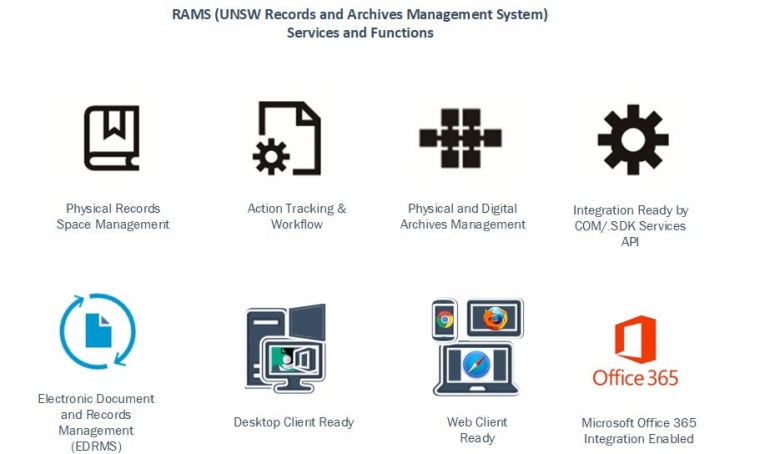
TRIM registers the existence and location of both paper and electronic format records, and allows users to request delivery of paper files. They may also directly access electronic files and documents from their desktop, allowing immediate access and, through the Desktop Client, editing capabilities.
TRIM has three different interfaces, all of which access the same database of records. These are:
TRIM Desktop Client
TRIM Web Client
TRIM WebDrawer
This is the complete desktop application with Microsoft Office integration. It requires the UNSW SOE Desktop environment for installation, due to the use of Active Directory to log-in.
The following units currently have access to the TRIM Desktop client:
Division of Research (all units)
Legal and Compliance Unit (Legal Office, Governance Support, Records & Archives Office)
Human Resources
Nura Gili Program Centre
Facilities Management
UNSW Library
Student Equity and Disabilities Office (SEADU)
Student Administration Services, UNSW Canberra
PVC (Students)
If you are a staff member from one of these units, who requires the TRIM Desktop client to be installed on your SOE PC or Laptop, please contact the IT ServiceDesk. You will need to provide your PC/Laptop name.
If you are not from one of these areas, but would like to enquire as to the availability of the TRIM Desktop client in your unit, please contact the Records Office.
User Guides for the TRIM Desktop Client is available here.
This is a browser-based, 'zero-footprint' version of TRIM. Users do not require any software to be installed on their PC, access is entirely enabled via web browser. (Note: x browser is recommended). TRIM Web Client does not provide any integration with desktop applications.
Login to TRIM Web Client. You may be required to add the prefix 'ADUNSW\' prior to your Z ID when logging in.
User Guides for the TRIM Web Client is available here.
A web-based, read-only version of TRIM, WebDrawer allows users to view and request retrieval of existing TRIM records online. This version is for occasional TRIM users who do not need to update records.
Login to TRIM WebDrawer. If you receive a login prompt, then for User Name, please enter 'adunsw\' then followed by your zStaff ID, and Password is your zPass (not UniPass).
User Guides for the TRIM WebDrawer is available here.
The Records and Archives Office runs group TRIM training sessions on the use of the TRIM Desktop client.
These sessions can have up to 12 participants, depending on demand, and cover the basics of TRIM use including creating files, capturing documents and emails, integration with Office applications, basic and advanced searching for records, and Shortcuts.
The Records Office can also run, by request, induction sessions for Staff in units using the full TRIM Client, in a one-on-one environment at the staff member's desk.
A range of Quick Reference Guides, Micro-Guides and Video Tutorials are available here.
How to access TRIM?
TRIM Training
What is TRIM?
TRIM is the corporate recordkeeping system of the University of NSW. It is used to capture, maintain and provide access to University records over time. TRIM is managed by the Records & Archives Office, the infrastructure that supports it is maintained by IT@UNSW.
By capturing records to TRIM, UNSW is able to meet the requirements of the NSW Standard on Digital Recordkeeping and NSW State Records Act. TRIM also enables our information resources for better decision-making, planning, customer service and collaborative work.
TRIM has been deployed across UNSW as part of a number of project-sponsored phased implementations. It is available to all University staff for the capture of all records relating to contracts and complaints.
TRIM registers the existence and location of both paper and electronic format records, and allows users to request delivery of paper files. They may also directly access electronic files and documents from their desktop, allowing immediate access and, through the Desktop Client, editing capabilities.
How to access TRIM?
TRIM has three different interfaces, all of which access the same database of records. These are:
TRIM Desktop Client
This is the complete desktop application with Microsoft Office integration. It requires the UNSW SOE Desktop environment for installation, due to the use of Active Directory to log-in.
The following units currently have access to the TRIM Desktop client:
If you are a staff member from one of these units, who requires the TRIM Desktop client to be installed on your SOE PC or Laptop, please contact the IT ServiceDesk. You will need to provide your PC/Laptop name.
If you are not from one of these areas, but would like to enquire as to the availability of the TRIM Desktop client in your unit, please contact the Records Office.
User Guides for the TRIM Desktop Client is available here.
TRIM Web Client
This is a browser-based, 'zero-footprint' version of TRIM. Users do not require any software to be installed on their PC, access is entirely enabled via web browser. (Note: x browser is recommended). TRIM Web Client does not provide any integration with desktop applications.
Login to TRIM Web Client. You may be required to add the prefix 'ADUNSW\' prior to your Z ID when logging in.
User Guides for the TRIM Web Client is available here.
TRIM WebDrawer
A web-based, read-only version of TRIM, WebDrawer allows users to view and request retrieval of existing TRIM records online. This version is for occasional TRIM users who do not need to update records.
Login to TRIM WebDrawer. If you receive a login prompt, then for User Name, please enter 'adunsw\' then followed by your zStaff ID, and Password is your zPass (not UniPass).
User Guides for the TRIM WebDrawer is available here.
TRIM Training
The Records and Archives Office runs group TRIM training sessions on the use of the TRIM Desktop client.
These sessions can have up to 12 participants, depending on demand, and cover the basics of TRIM use including creating files, capturing documents and emails, integration with Office applications, basic and advanced searching for records, and Shortcuts.
The Records Office can also run, by request, induction sessions for Staff in units using the full TRIM Client, in a one-on-one environment at the staff member's desk.
A range of Quick Reference Guides, Micro-Guides and Video Tutorials are available here.